Start the conversation.
When a phone number is available, the visitor can choose Call directly from the public profile.
Public Profiles
A Digica public profile brings your identity, contact details and useful links into one mobile-ready destination — so people can understand who you are, take the next action and save your contact with less friction.
One Digica link
A Digica public profile gives the recipient one destination for your identity, contact details and useful next actions. The links can stay organized inside the profile instead of competing for attention in a message.
Profile anatomy
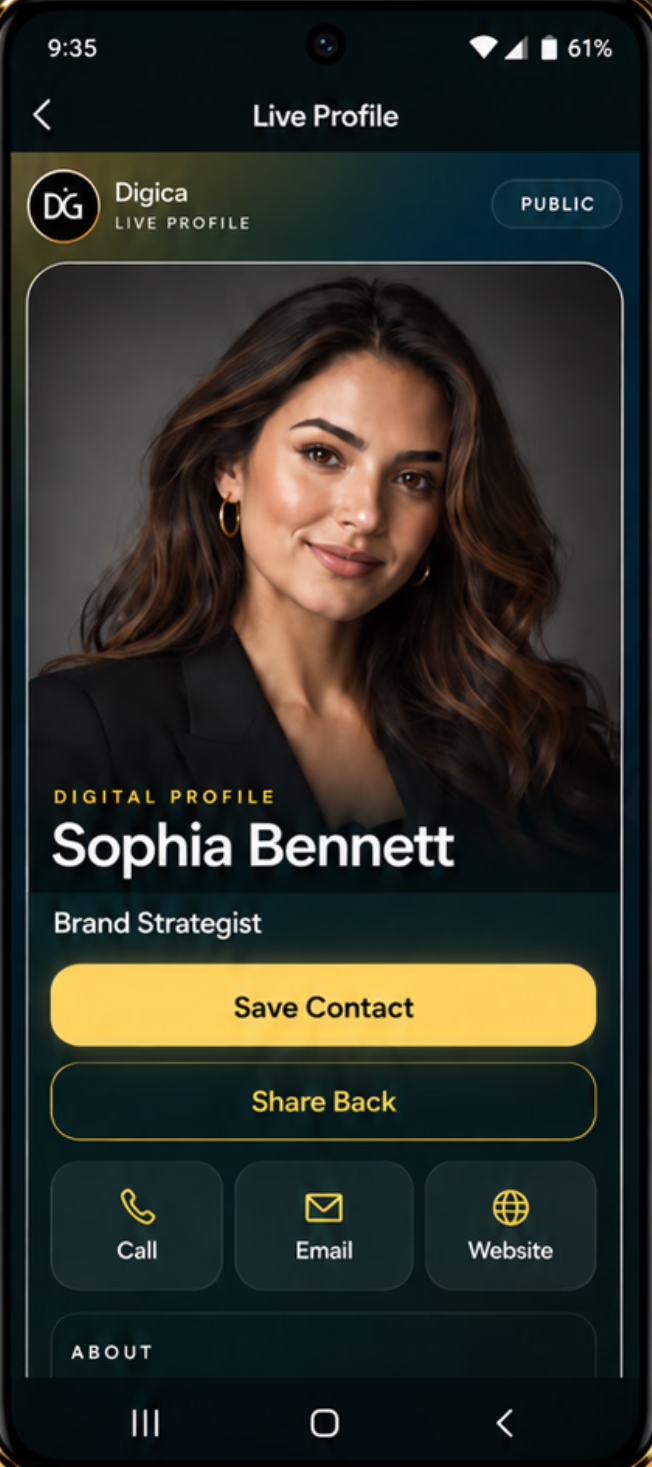
Profile image, name and professional context establish who the visitor has opened.
Save Contact and Share Back are presented prominently in the current viewer.
Call, Email and Website appear when those details are available on the profile.
Additional context and enabled destinations can continue below the primary actions.
Useful, not static
When a phone number is available, the visitor can choose Call directly from the public profile.
Save Contact begins the contact-saving workflow when the visitor chooses it.
The current profile includes Share Back as a deliberate recipient action, not an invisible tracking mechanism.
Different contexts. Same system.
These sanitized examples use the same current Digica profile structure. They change the identity, context and supported destinations — not the underlying product into fictional templates.
Strategy, project guidance, and a clear way to continue the conversation.
Mobile-first by design
Send the link where the conversation is already happening. The recipient opens the profile, scans the important information, then chooses the action that makes sense — including Save Contact.
A recipient does not need the Digica app simply to open a shared public profile.
Persistent destination
Public profile answers
It is a shareable web profile that organizes your identity, contact details and enabled links or widgets in one destination.
No. A shared Digica public profile can open in the recipient’s browser.
Yes. The current public profile includes Save Contact so the visitor can choose to begin the contact-saving workflow.
Yes. A profile can represent professional or business context and expose the relevant contact details, links and supported widgets you enable.
Yes. You can update profile information while continuing to use the same public Digica destination, subject to the current product and plan capabilities.
Current profiles can show identity and professional context, direct contact actions, an About section, and enabled links or supported widgets.
One profile. One destination.
Create your Digica public profile so people can open one organized destination, understand what matters, choose a useful next action and save your contact.