PROFESSIONAL CONTEXT · PRODUCT TRUTH FIRST
For professionals
Show up prepared before the follow-up starts.
Build one professional Digica presence, share it when the introduction happens, and give the other person a real profile they can understand, save, and revisit.
Real Public ProfileBrowser-based for recipientsNo automatic lead capture
DEMO PROFESSIONALYour identityRole · company · useful context
DGPUBLIC PROFILEProfessional profileSave ContactCall · Email · Website
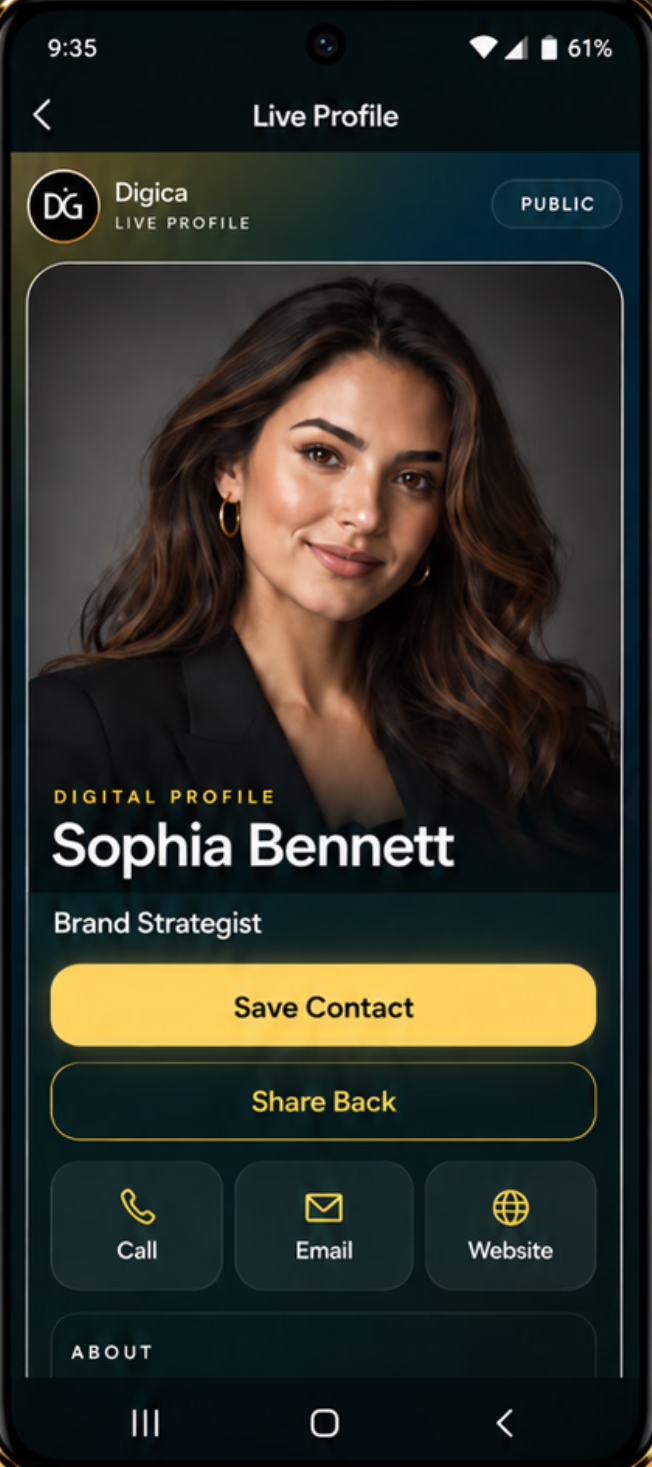
RECIPIENT SEESOne useful destinationCall · Save · Share · links
Build your professional presence
Prepare the context before you need to introduce yourself.
Your Digica Public Profile can combine identity, professional context, direct contact actions, and selected links or widgets in one mobile-first destination.
01IdentityPhoto, name, role, company context02ContactCall, email, website where published03ContextAbout, services, links, supported widgets04ActionSave Contact and Share Back
DGPUBLIC PROFILEProfessional profileSave ContactCall · Email · Website
01Identity + role
02Save Contact
03Direct actions
04Context + links
LinkedInWebsiteEmailServicesSocialExternal booking
ONE SHAREABLE PRESENCE
DGPUBLIC PROFILEProfessional profileSave ContactCall · Email · Website
Share in the moment
Use the handoff that fits the conversation.
Share the same Public Profile by direct link, visible QR, or an optional compatible Digica product. The recipient deliberately opens the profile and stays in control.
↗Direct linkMessage, email signature, social bio, or your own phone.▦QRA visible scan that opens the public destination.⌁Compatible NFCA close-range physical handoff where supported.
LINKQROPTIONAL CARD
Digica Pulse
DGPUBLIC PROFILEProfessional profileSave ContactCall · Email · Website
RECIPIENT CHOOSESOpen · Save · Act
01SALES · DEMO PERSONA
Sales professionalMake the handoff useful after the consultation.
Share one professional destination, let the recipient review your context, and give them a visible Save Contact action for later follow-up.
Role + business contextSave ContactWebsite + direct actions
02CONSULTING · DEMO PERSONA
Consultant / advisorPut credibility and useful next steps in one place.
Keep your professional context, contact options, selected services, and external destinations together without pretending Digica replaces your website or booking service.
Professional headlineServices + linksExternal booking destination
03FOUNDER · DEMO PERSONA
Founder / business ownerConnect personal identity with business context.
Present who you are, what you lead, and the company destinations that matter while keeping the profile focused on the individual introduction.
Personal identityCompany contextWebsite + social destinations
04SERVICE · DEMO PERSONA
Service professionalHelp a new contact understand what you do quickly.
Use a clear profile with contact details, service context, and selected links so the recipient can choose the next step that fits.
Contact detailsService contextRelevant links / widgets
DGPUBLIC PROFILEProfessional profileSave ContactCall · Email · Website
CALLSAVE CONTACTSHARE BACKEMAILWEBSITE
Real recipient actions
Give the other person useful choices, not an automated sales sequence.
The current Public Profile exposes visible actions such as Save Contact and Share Back, plus direct contact actions when those details are published. The recipient decides what to use.
- 01
OpenThe recipient opens your browser-based profile.
- 02
ChooseThey select Save Contact or another visible action.
- 03
CompleteThe phone completes its normal contact-saving or destination flow.
01WORKPrimary professional profileClient + business context
02SIDE BUSINESSIndependent offeringSeparate links + positioning
03NETWORKINGFocused introductionSelected identity + contact actions
ONE ACCOUNT · PLAN-BASED PROFILE CAPACITY
BEFOREOld roleOld website
SAME DIGITAL DESTINATIONCurrent roleCurrent website
Keep the digital profile current
Update the profile without changing the destination you already shared.
When your published role, website, phone, or professional information changes, update the Digica profile. This does not claim that previously saved phone contacts, printed card artwork, or external services update automatically.
01BEFOREPrepare
Keep your professional identity, contact details, context, and selected destinations current.
02DURINGShare
Use the profile link, QR, or an optional compatible Digica product when the introduction happens.
03RECIPIENTOpen + save
The other person opens the Public Profile and chooses whether to call, save, share, or visit a link.
04AFTERReconnect
The same digital destination remains available to revisit later, with your current published profile information.
Digica Pulse
DGPUBLIC PROFILEProfessional profileSave ContactCall · Email · Website
Optional physical tool
Add a physical handoff only when it improves the introduction.
You do not need a physical product to use Digica. A compatible Digica Card can add a convenient tap-or-scan moment while the digital Public Profile remains the useful destination.
Marketplace remains authoritative for current products, pricing, stock, variants, and checkout.
Your next introduction
Make it easier to remember what comes next.
Create one professional Digica presence, share it deliberately, and give the recipient something useful to save and revisit.
DGPUBLIC PROFILEProfessional profileSave ContactCall · Email · Website